T3 Code: The VS Code of the AI Agent Era?

For the past two weeks, more than a hundred agents have been working for me, and I haven't managed a single one directly.
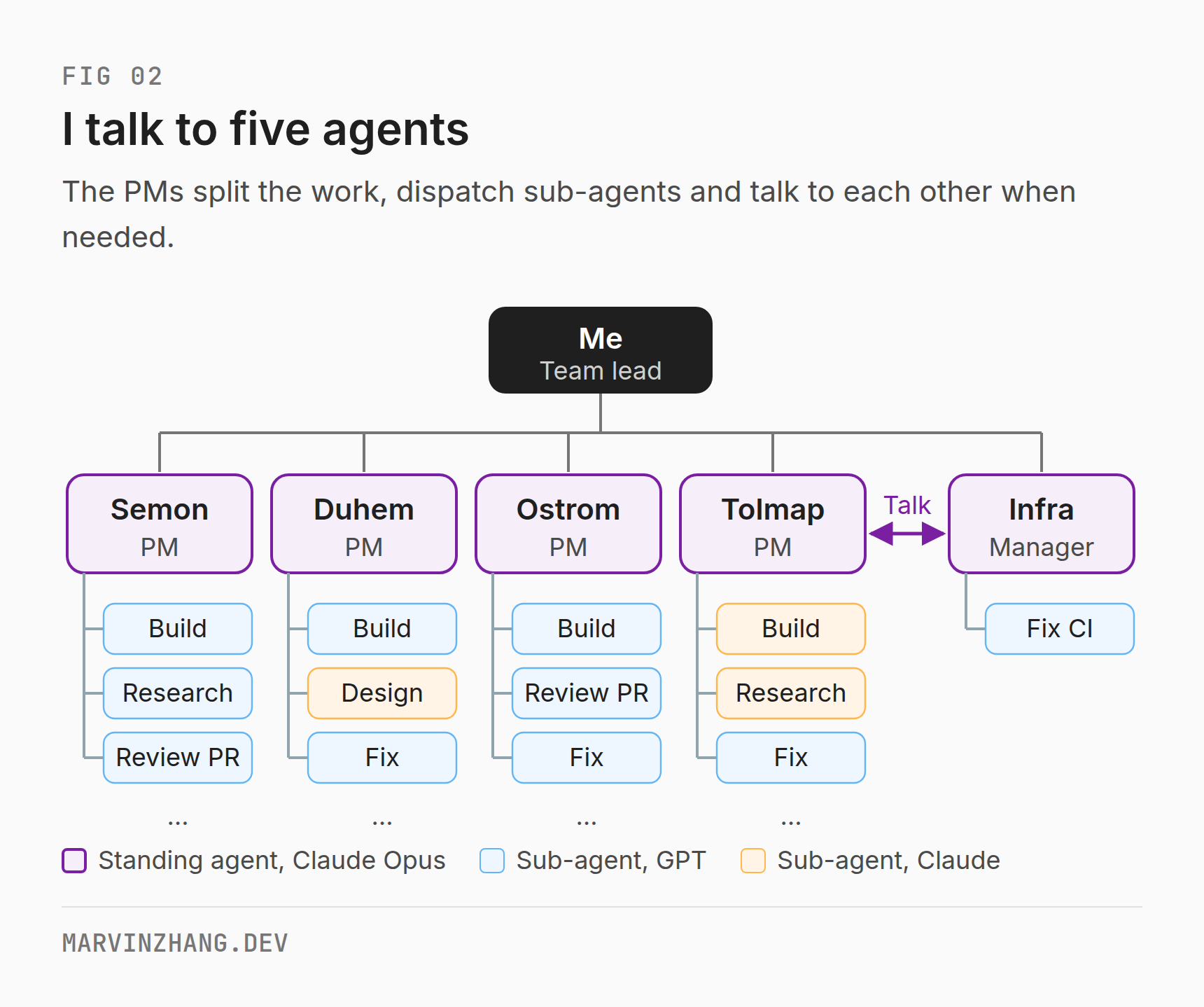
I only talk to five agents. Four each own one open source project and the fifth handles infrastructure, so they act as project managers. They split the work, hand it out, talk things over with each other, and report back to me when it's done. I'm the head of this agent team, a bit like a director in a company.
What makes this possible is a free tool called T3 Code.
People often call T3 Code the VS Code of the agent era. But the features I can't give up are described almost word for word in Paseo's docs, and the official Codex and Claude apps ship a new version nearly every week. Anyone can build the features. So why T3 Code?
That's what this post tries to answer. First, how VS Code won last time. Then what T3 Code does today and how it compares with similar tools. Finally, what keeps users around once features can be copied in days.
One tool per vendor
Ten-plus years ago, the language you wrote mostly decided the tool you used.
C# meant Visual Studio, tied to Windows and .NET. iOS meant Xcode, which only works on Apple's platforms. Java developers picked between Eclipse and IntelliJ, and Eclipse had plenty of plugins but was slow and heavy. JetBrains took the model furthest: IntelliJ for Java, PyCharm for Python, WebStorm for the front end, GoLand for Go. One IDE per language, each with its own paid professional edition. These are excellent tools, good enough that many people still won't give them up.
When Microsoft released VS Code in 2015, it lost to every rival on features. Its debugger was weaker than Visual Studio's and its refactoring weaker than IntelliJ's. It started out as an editor that opened fast.
It won on things that had little to do with features.
The first was being free and open source. Developers could try it without paying, and companies could adopt it without a procurement process.
The second was neutrality. In 2016 Microsoft, Red Hat and others launched the Language Server Protocol (LSP), which moved "understanding a language" out of the editor and into servers each language community builds for itself. VS Code no longer had to write support for each language. Once a community shipped a language server, VS Code supported that language. One editor treating every language equally doesn't fit the JetBrains model, because JetBrains' business is selling an IDE per language.
The third was the extension marketplace. Anyone can write a VS Code extension, and someone has built one for almost every need: themes, languages, debuggers, remote development. The first two points got people to try it. The marketplace kept them, because once your workflow rests on a few dozen extensions, switching editors costs far too much.
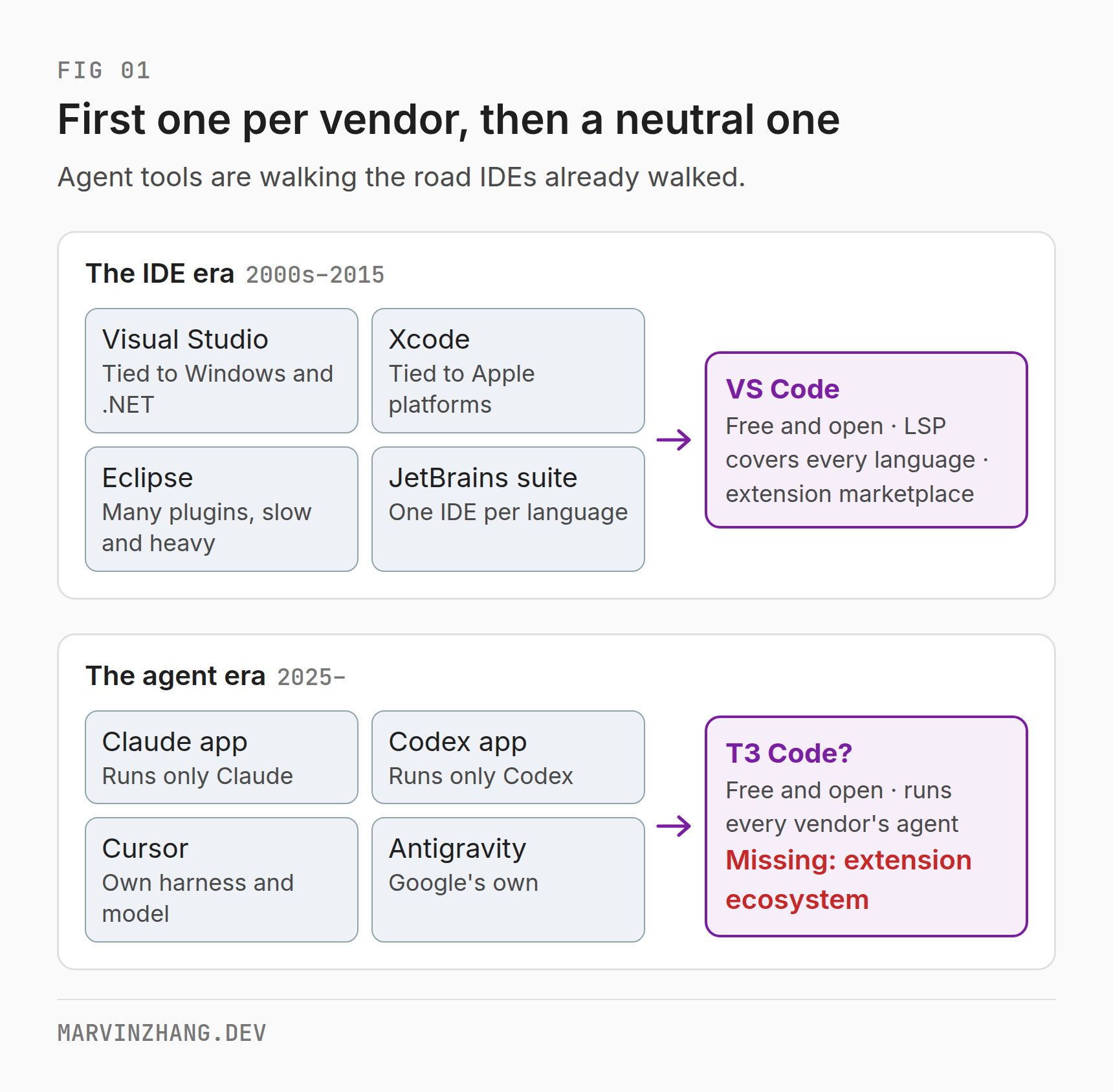
Agent tools are walking the same road. Claude Code has an official app, Codex has an official app, Cursor has its own harness and model, and Google has Antigravity. All of them are good, and each treats only its own agent as a first-class citizen. One app per model vendor is the same pattern as one IDE per language.
So the question becomes: who will be the neutral workbench of the agent era?
What T3 Code does
T3 Code is an open source desktop app from Ping Labs, MIT licensed and free. It's led by Theo Browne, who is well known among US developers: a former Twitch engineer turned founder whose team built the T3 Stack and T3 Chat, and an outspoken tech YouTuber. T3 Code ships no model of its own. It runs a local server on your machine that drives the agents you already have installed, such as Claude Code, Codex, Cursor, OpenCode and Grok Build, on your own subscriptions. The desktop, web and mobile apps are all just windows onto that local server.
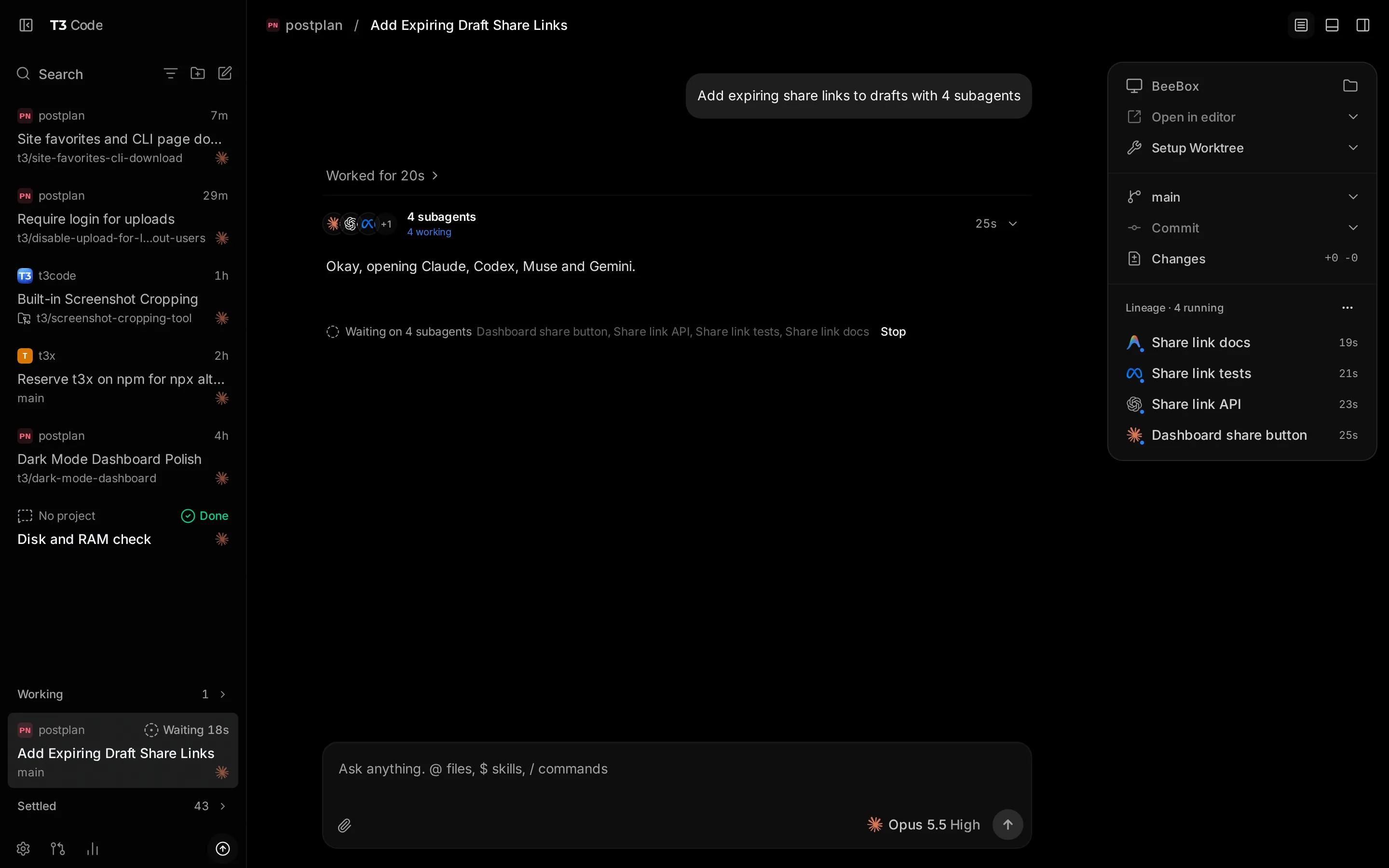
Image: T3 Code website
It runs agents in parallel, previews pages inside the app, and lets you approve the next step from your phone, and all of that works well. What I really can't give up is something else: orchestration.
An agent in T3 can open new threads (each thread has an agent behind it), send messages to other threads, wait for their results, and dispatch work to another machine, another harness or another vendor's model. Threads can talk to each other, work together, and even manage each other.
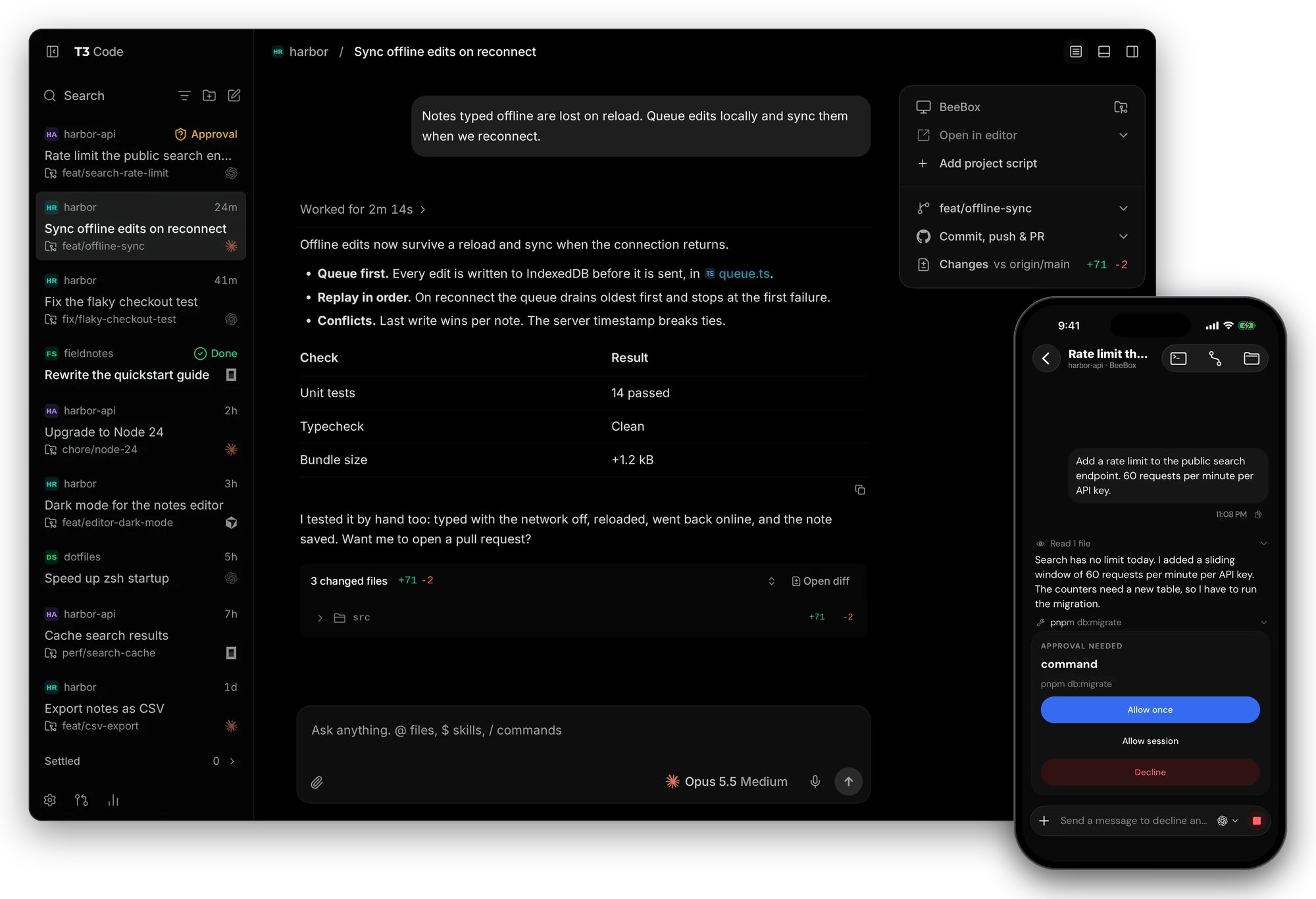
Image: T3 Code GitHub repository. One request, four sub-agents, four vendors' models.
This is how I use it:
| Standing agent | Project | What the project does |
|---|---|---|
| Semon PM | Semon | Collects, queries and analyzes agent session logs across machines |
| Duhem PM | Duhem | Whole-system verification for AI-written software (earlier post) |
| Ostrom PM | Ostrom | Takes GitHub events and dispatches background agents to handle them |
| Tolmap PM | Tolmap | Turns a codebase into a map a person can hold in their head |
| Infra Manager | none | CI, deployment and other cross-project work |
None of these projects is well known. They're listed only to show what each project manager is responsible for.
I only talk to these five agents. When a project manager gets a task, it splits the work and decides who gets what: hard design goes to a stronger model, simple implementation to a cheaper one, and once code is written another sub-agent reviews it. When two project managers need something from each other, they talk it out in each other's threads and tell me the outcome.
Here's an example. On November 14, I told one agent to move the CI for two of my projects back onto GitHub's own runners.
After that I mostly stayed out of it. The agent opened a new thread and handed the job to an agent that looks after my infrastructure. That agent read the config in both repositories, noticed that one of the projects belongs to a different agent, and went to that agent to sort it out. The other agent asked which branch the PR should be based on. A few minutes later each repository had a PR. Along the way it found that CI had been switched off during an earlier cost cleanup, so it turned it back on. It also found a broken local clone, left it alone, and told me about it.
Here is who talked to whom:
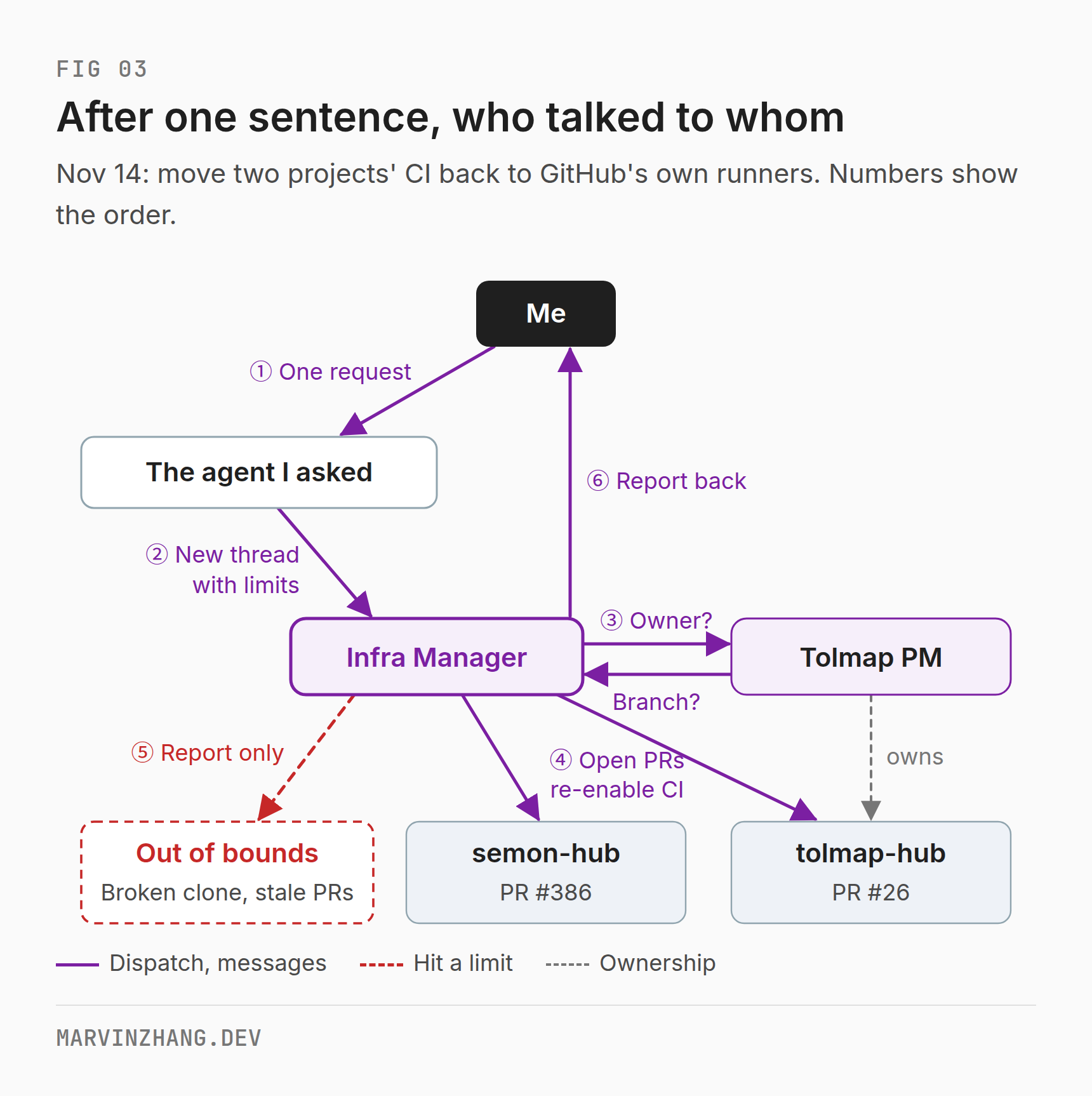
Two details stand out.
First, authority has limits. The brief given to the Infra Manager said not to destroy the old CI servers itself, and to ask me before removing deploy workflows wholesale. So when it hit the broken clone and the conflicting old PRs, it reported them and didn't touch them. That is how anyone running a team should delegate: say clearly what someone may do, and what needs sign-off first.
Second, switching models costs almost nothing. The project managers run on Claude and the sub-agents mostly on GPT, and switching is one parameter on the dispatch. For this I use Magpie, a popular open source model gateway that lets one harness call models from several vendors. T3 itself can also hand a task to a different harness, for example from Claude Code to Codex.
I've run this setup for about two weeks and it hasn't gone wrong yet: no distorted reports, no project managers stepping on each other, no one overstepping. Still, it hasn't been long and the sample is small, so I won't claim it will stay this way. The coordination cost of multi-agent teams is real, and every extra layer is another chance for information to get distorted on its way up. I accept the extra layer of project managers because my attention costs more than code. I used to watch every agent. Now I watch five, and I've stopped babysitting my agents. It's the same idea as the Viable System Model from cybernetics: each layer handles the complexity at its own level and only passes up what it can't handle.
T3 has clear weak spots too. If you switch a thread to a different model mid-conversation, the new model doesn't get the earlier reasoning or tool-call history, so some context is lost. New threads give the agent full access by default, and T3's own docs say the permission modes aren't a real security boundary. And T3's adapters always lag a step behind each vendor's new agent features.
Why the others don't get there
The tools people compare with T3 Code fall into two groups.
The first group is the model vendors' own apps: Claude Code, Codex, Cursor and Antigravity. Capability isn't their problem. A Japanese developer counted releases between August 8 and November 8: Claude Code shipped 81 stable versions, Codex 35 and T3 Code only 20. Parallel agents, remote control, mobile apps and cloud sessions are all in the official apps now.
But neither Claude Code's nor Codex's changelog has a single entry for running the other vendor's agent. Codex can import Claude Code settings but can't run Claude Code's agent. Cursor built a slick multi-agent window around its own harness and model.
That comes from the business, not from engineering skill. A model vendor makes money selling its model and has no reason to put a rival's model on equal footing. JetBrains wasn't going to build a free editor for every language, and Anthropic isn't going to build an app that makes it easy to hand your work to GPT.
The second group is neutral third-party tools: Paseo, Happy and HAPI. Like T3, they don't sell models. Their problem points the other way: the features have largely converged.
| T3 Code | Paseo | Happy | HAPI | |
|---|---|---|---|---|
| Cross-model, cross-harness | ✅ | ✅ | ✅ | ✅ |
| Cross-machine | ✅ | ✅ | Not documented | ✅ |
| Agents dispatch to and message each other | ✅ | ✅ | Sub-agents only | ✅ |
| Main form | Desktop + mobile | Desktop + mobile | Mobile-first | Mobile-first |
| License | MIT | Apache-2.0 | MIT | AGPL-3.0 |
| GitHub stars | 63k+ | 24.2k | 24.7k | 5.4k |
Happy is closer to a remote control on your phone, and its orchestration is shallow. Paseo and HAPI are different. Paseo's README says its agents can "create worktrees, launch other agents, and talk to them, across providers", and it supports multiple machines. HAPI's docs describe a set of tools agents can use to find other sessions, read them, message them and start new ones, including on other machines. Going by the docs, both have nearly all the orchestration I use in T3.
I haven't used Paseo, so I can't say how well it works. A lot of what people say online is positive. In a Hacker News thread, one user likes it because they can mix and match harnesses and models, another says its mobile app matches the desktop, and another says its session sync beats Claude Code's mobile app.
The licenses deserve a look too. MIT and Apache-2.0 are both permissive: you can modify and sell the code, and Apache-2.0 adds a patent grant. AGPL-3.0 is strong copyleft. If you modify HAPI and offer it over a network, you must publish your changes, which is a hurdle for anyone building a commercial product on it. T3 goes furthest here. Its website has a button that reads "Steal our code (legally)".
So we're back to the question. Everyone has the features, and T3 gives its own code away. What does it have?
If features don't keep users, what does?
The first time I saw T3 Code, it looked a lot like the official Codex app. There's a reason. When T3 Code launched on Hacker News in March, the title was "T3 Code – a new OSS agentic coding app that wraps Codex". It started as a shell around Codex and still connects to Codex through OpenAI's Codex App Server. Claude and the other agents came later.
T3 borrowed from Codex and invites everyone to borrow from it. When an agent can build a feature in a few days, features, interfaces and even code stop being a moat. I think three things actually keep users.
The first is neutrality and trust. T3 doesn't sell models. Supporting Claude today, GPT tomorrow and some unreleased model after that makes no difference to its business. That means users can bet their whole workflow on it without worrying that it will one day sideline other vendors to push its own model. Theo's team took the same path with T3 Chat: no model of their own, every vendor's models in one interface. Neutrality is how this company plays. However fast the official apps ship, their business model doesn't allow it.
The second is iteration speed and taste. Features can be copied. Judgment can't. Knowing what to build, what to leave out and how far to take it comes from a team using its own product every day. T3 is still at version 0.1, yet it has more than a hundred contributors, with 114 in version 0.0.34 alone. After this long with it, my strongest impression is that many of its designs feel worn in by real workflows. Agents dispatching work to each other, waiting for results and scheduling across machines are things you only start to need once you're running several agents at a time.
The third is community and ecosystem. This is the moat VS Code won with in the end, and the only one T3 lacks today.
The demand is clear. In July someone on GitHub proposed an extension API that would let third parties hook lifecycle events and add settings and panels to the UI. In August someone proposed a plugin SDK for embedding external web pages into T3's panels with scoped permissions. Community members have submitted around 18 plugin-related PRs. As of November none of these proposals has a formal maintainer response, and one community member wrote in the discussion: "No maintainer has agreed to the direction yet." People who can't wait either fork it, giving up signed auto-updates, or run small web apps in T3's preview panel to work around the gap.
The maintainers' caution makes sense. When a VS Code extension misbehaves, the worst case is a frozen editor. A T3 plugin sits next to an agent with full access to your machine, so the stakes are much higher, and that security model is hard to design. Hard or not, until T3 takes this step it's just a very good shell. Today it leads on neutrality and taste, and the next team that is just as neutral and has just as much taste can match both. Only an ecosystem makes people think twice before leaving.
So is it the VS Code of the agent era?
Not yet, but it's halfway there.
VS Code won on three things: free and open source, neutrality, and an extension ecosystem. T3 Code has the first two and is still outside the door on the third. If you want to know whether it will make it, watch for one simple signal: when it ships a formal, versioned extension API. Until that day, rivals can match every step it takes. After it, catching up gets more expensive every month.
That said, the editor comparison undersells it. VS Code made it easier for one person to write code. What I do in T3 is closer to one person running a team: I don't write the code or watch the agents, I talk to a few project managers and they work things out among themselves. VS Code never did this, because when it arrived there were no agents to manage.
Ten years from now, people may remember T3 Code as the first tool that let an ordinary developer run a team of agents. First, though, it has to build the ecosystem.