实战爬虫:如何利用 Webspot 实现自动提取列表页

引子
利用爬虫程序抓取列表页是网络数据提取中非常常见的任务之一。对于爬虫工程师来说,如何高效的生成提取规则是非常有必要的,否则就会浪费很多时间在编写爬虫程序 CSS 选择器或 XPath。本文将用一个实际例子来展示如何使用开源工具 Webspot 来实现自动提取列表页。
Webspot
Webspot 是一个旨在自动化网页数据提取的开源项目,目前支持列表页及分页的识别和抓取规则提取,此外还提供了 Web UI 界面让用户可以可视化的查看识别出来的结果,还可以让开发人员利用 API 获取识别结果。
Webspot 安装非常简单,可以参考官方文档中的安装教程,利用 Docker 和 Docker Compose 进行安装。
# clone git repo
git clone https://github.com/crawlab-team/webspot

# start docker containers
docker-compose up -d
然后,等待程序启动,应该会需要半分钟左右初始化应用。
初始化完毕后,你可以访问网页界面 http://localhost:9999,应该可以看到如下界面,这表示已经启动成功了。
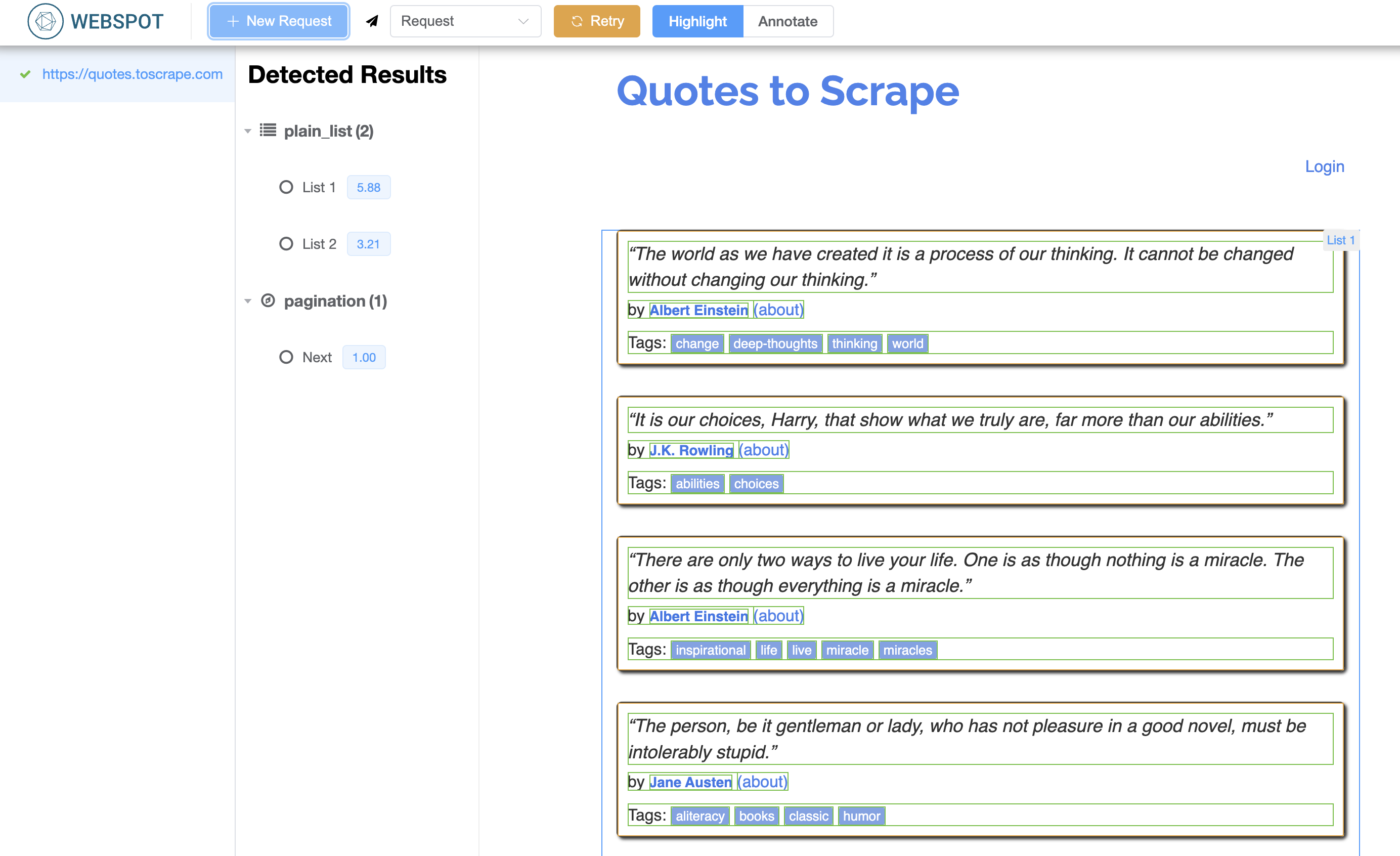
现在,可以发起一个识别请求,点击 New Request,输入 https://quotes.toscrape.com,点击 Submit,等待片刻可以看到如下界面。
利用 API 自动抓取数据
下面我们将用 Python 程序调用 Webspot 的 API 来自动抓取数据。
整个流程如下。
- 调用 Webspot API 获取提取规则(Extract Rules),即列表页和分页的提取规则,提取规则是 CSS Selector。
- 根据列表页的提取规则定义抓取目标,即列表页的每一项以及其对应的字段。
- 根据分页的提取规则确定抓取下一页的目标,让爬虫程序自动抓取下一页的数据。
调用 API
调用 API 非常简单,只需要将待识别的 URL 传入 body 中即可。代码如下。
import requests
from bs4 import BeautifulSoup
from pprint import pprint

# API endpoint
api_endpoint = 'http://localhost:9999/api'

# url to extract
url = 'https://quotes.toscrape.com'

# call API to recognize list page and pagination elements
res = requests.post(f'{api_endpoint}/requests', json={
    'url': 'https://quotes.toscrape.com'
})
results = res.json()
pprint(results)
用 Python Console 运行,会得到识别结果数据,类似下面结果。
{...
 'method': 'request',
 'no_async': True,
 'results': {'pagination': [{'detector': 'pagination',
                             'name': 'Next',
                             'score': 1.0,
                             'scores': {'score': 1.0},
                             'selectors': {'next': {'attribute': None,
                                                    'name': 'pagination',
                                                    'node_id': 120,
                                                    'selector': 'li.next > a',
                                                    'type': 'css'}}}],
...
             'plain_list': [{...
             									'fields': [{'attribute': '',
                                         'name': 'Field_text_1',
                                         'node_id': None,
                                         'selector': 'div.quote > span.text',
                                         'type': 'text'},
                                         ...],
             							...}],
						},
...}
识别结果包括列表页和分页的 CSS Selector 以及列表页每一项对应的各个字段。
列表页及字段提取逻辑
下面我们将编写列表页及字段提取的逻辑。
首先,我们可以通过 results 获取列表页项选择器 list_items_selector 和字段列表 fields。
# list result
list_result = results['results']['plain_list'][0]

# list items selector
list_items_selector = list_result['selectors']['full_items']['selector']
print(list_items_selector)

# fields
fields = list_result['fields']
print(fields)
然后,我们可以编写解析列表页项的逻辑。
def get_data(soup: BeautifulSoup) -> list:
    # data
    data = []

    # items
    items_elements = soup.select(list_items_selector)
    for el in items_elements:
        # row data
        row = {}

        # iterate fields
        for f in fields:
            # field name
            field_name = f['name']

            # field element
            field_element = el.select_one(f['selector'])

            # skip if field element not found
            if not field_element:
                continue

            # add field value to row
            if f['type'] == 'text':
                row[field_name] = field_element.text
            else:
                row[field_name] = field_element.attrs.get(f['attribute'])

        # add row to data
        data.append(row)

    return data
在上面代码的函数 get_data 中,我们传入了 BeautfifulSoup 实例,并利用 list_items_selector 及 fields 解析并获取了列表数据 data,返回给函数调用者。
请求列表页及分页逻辑
接下来,我们需要编写请求列表页和分页逻辑了,也就是请求指定 URL,解析出分页,并调用上面的 get_data。
我们首先需要获取分页的 CSS Selector。
# pagination next selector
next_selector = results['results']['pagination'][0]['selectors']['next']['selector']
print(next_selector)
然后,我们编写爬虫逻辑 ,也就是连续抓取网站列表页的数据。
def crawl(url: str) -> list:
    # all data to crawl
    all_data = []

    while True:
        print(f'requesting {url}')

        # request url
        res = requests.get(url)

        # beautiful soup of html
        soup = BeautifulSoup(res.content)

        # add parsed data
        data = get_data(soup)
        all_data += data

        # pagination next element
        next_el = soup.select_one(next_selector)

        # end if pagination next element not found
        if not next_el:
            break

				# url of next page
        url = urljoin(url, next_el.attrs.get('href'))

    return all_data
这样我们就编写好了所有逻辑。
完整代码
下面是整个抓取逻辑的完整代码。
from urllib.parse import urljoin

import requests
from bs4 import BeautifulSoup
from pprint import pprint


def get_data(soup: BeautifulSoup) -> list:
    # data
    data = []

    # items
    items_elements = soup.select(list_items_selector)
    for el in items_elements:
        # row data
        row = {}

        # iterate fields
        for f in fields:
            # field name
            field_name = f['name']

            # field element
            field_element = el.select_one(f['selector'])

            # skip if field element not found
            if not field_element:
                continue

            # add field value to row
            if f['type'] == 'text':
                row[field_name] = field_element.text
            else:
                row[field_name] = field_element.attrs.get(f['attribute'])

        # add row to data
        data.append(row)

    return data


def crawl(url: str) -> list:
    # all data to crawl
    all_data = []

    while True:
        print(f'requesting {url}')

        # request url
        res = requests.get(url)

        # beautiful soup of html
        soup = BeautifulSoup(res.content)

        # add parsed data
        data = get_data(soup)
        all_data += data

        # pagination next element
        next_el = soup.select_one(next_selector)

        # end if pagination next element not found
        if not next_el:
            break

        # url of next page
        url = urljoin(url, next_el.attrs.get('href'))

    return all_data


if __name__ == '__main__':
    # API endpoint
    api_endpoint = 'http://localhost:9999/api'

    # url to extract
    url = 'https://quotes.toscrape.com'

    # call API to recognize list page and pagination elements
    res = requests.post(f'{api_endpoint}/requests', json={
        'url': 'https://quotes.toscrape.com'
    })
    results = res.json()
    pprint(results)

    # list result
    list_result = results['results']['plain_list'][0]

    # list items selector
    list_items_selector = list_result['selectors']['full_items']['selector']
    print(list_items_selector)

    # fields
    fields = list_result['fields']
    print(fields)

    # pagination next selector
    next_selector = results['results']['pagination'][0]['selectors']['next']['selector']
    print(next_selector)

    # start crawling
    all_data = crawl(url)

    # print crawled results
    pprint(all_data[:50])
运行代码,最后可以得到如下结果数据。
[{'Field_link_url_6': '/author/Albert-Einstein',
  'Field_link_url_8': '/tag/change/page/1/',
  'Field_text_1': '“The world as we have created it is a process of our '
                  'thinking. It cannot be changed without changing our '
                  'thinking.”',
  'Field_text_2': '“The world as we have created it is a process of our '
                  'thinking. It cannot be changed without changing our '
                  'thinking.”',
  'Field_text_3': '\n'
                  '            Tags:\n'
                  '            \n'
                  'change\n'
                  'deep-thoughts\n'
                  'thinking\n'
                  'world\n',
  'Field_text_4': 'Albert Einstein',
  'Field_text_5': '(about)',
  'Field_text_7': 'change'},
  ...
这样,我们就实现了利用 Webspot 自动提取列表的爬虫任务。不需要显式的定义 CSS Selector 或 XPath,只需要调用 Webspot 的 API 就可以获取到列表页数据。
社区
如果您对笔者的文章感兴趣,可以加笔者微信 tikazyq1 并注明 "码之道",笔者会将你拉入 "码之道" 交流群。